4.4.5. Sentinel-1
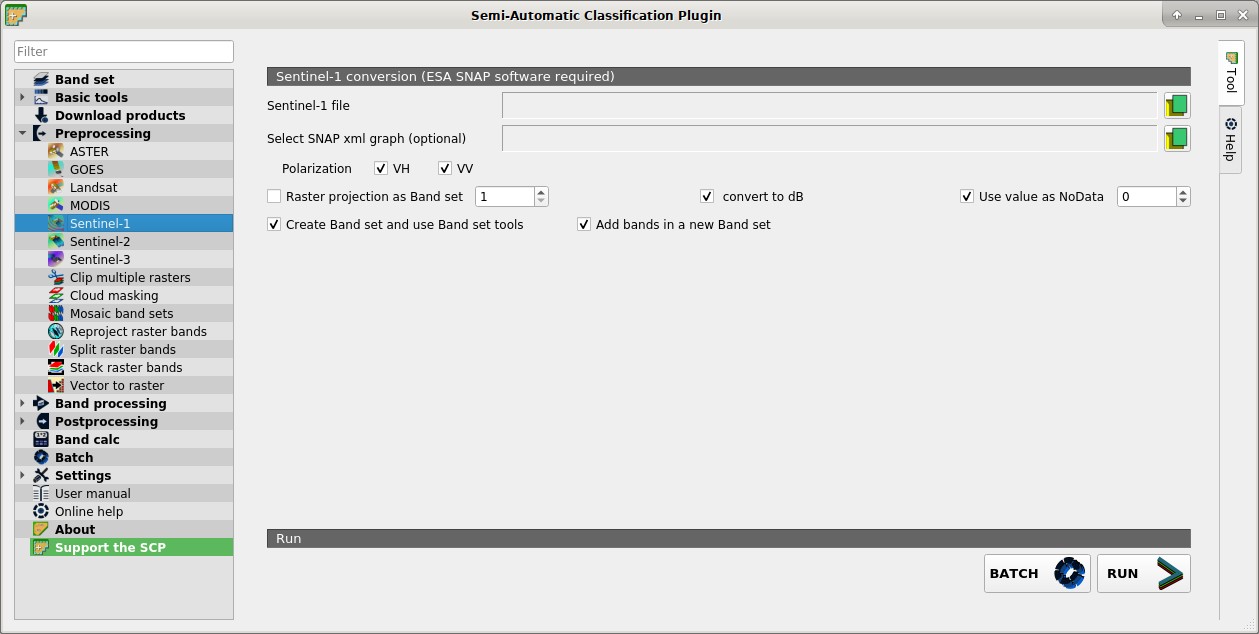
 Sentinel-1
This tab allows for the conversion of Sentine-1 images, in particular Sentinel-1 Satellites images (GRD) VV and VH polarizations. For the processing method please read Sentinel-1 preprocessing.
These processes are performed through the SNAP Graph Processing Tool (GPT) and a graph file .xml . Therefore, SCP requires ESA SNAP to perform the preprocessing. For the installation of ESA SNAP, please visit this page http://step.esa.int/main/download/snap-download/ .
The path to the SNAP gpt executable must be entered in settings Processing.
4.4.5.1. Sentinel-1 conversion
Sentinel-1 file
 : open a Sentinel-1 file (.zip);
Select SNAP xml graph (optional)
 : select a custom graph file (.xml) to be used for preprocessing; predefined variables for the xml graph can be:
 $inputfor the input file,$polarizationfor VV or VH polarization if only one polarization is checked,$outputfor the output file ($outputVVand$outputVHif both polarizations are checked);Polarization
 VV VH: if checked, process VV and VH polarizations;
- Raster projection as Band set
 : if checked, project the raster to the same coordinate reference system as a band set (default WGS 84);
 - convert to dB: if checked, convert values to dB;
- Use value as NoData : if checked, pixels having
NoDatavalue are not counted during conversion; - Create Band set and use Band set tools: if checked, bands are added to the active Band set after the conversion; also, the Band set is processed according to the tools checked in the Band set;
- Add bands in a new Band set: if checked, bands are added to a new empty Band set after the conversion;
4.4.5.2. Metadata
All the bands found in the Directory containing Landsat bands are listed in the table Metadata. If the Landsat metadata file (a .txt or .met file with the suffix MTL) is provided, then Metadata are automatically filled. For information about Metadata fields read this page and this one .
Satellite
 : satellite name (e.g. Landsat8);
Date
: date of acquisition (e.g. 2013-04-15);Sun elevation
: Sun elevation in degrees;Earth sun distance
: Earth Sun distance in astronomical units (automatically calculated if Date is filled; : remove highlighted bands from the table Metadata;
 Metadata: table containing the following fields;
Band: band name;
RADIANCE_MULT: multiplicative rescaling factor;
RADIANCE_ADD: additive rescaling factor;
REFLECTANCE_MULT: multiplicative rescaling factor;
REFLECTANCE_ADD: additive rescaling factor;
RADIANCE_MAXIMUM: radiance maximum;
REFLECTANCE_MAXIMUM: reflectance maximum;
K1_CONSTANT: thermal conversion constant;
K2_CONSTANT: thermal conversion constant;
LMAX: spectral radiance that is scaled to QCALMAX;
LMIN: spectral radiance that is scaled to QCALMIN;
QCALMAX: minimum quantized calibrated pixel value;
QCALMIN: maximum quantized calibrated pixel value;
BATCH
 : add this function to the Batch;
RUN
 : select an output directory and start the conversion process; only bands listed in the table Metadata are converted; converted bands are saved in the output directory with the prefix
 RT_and automatically loaded in QGIS;