4.1. Band set
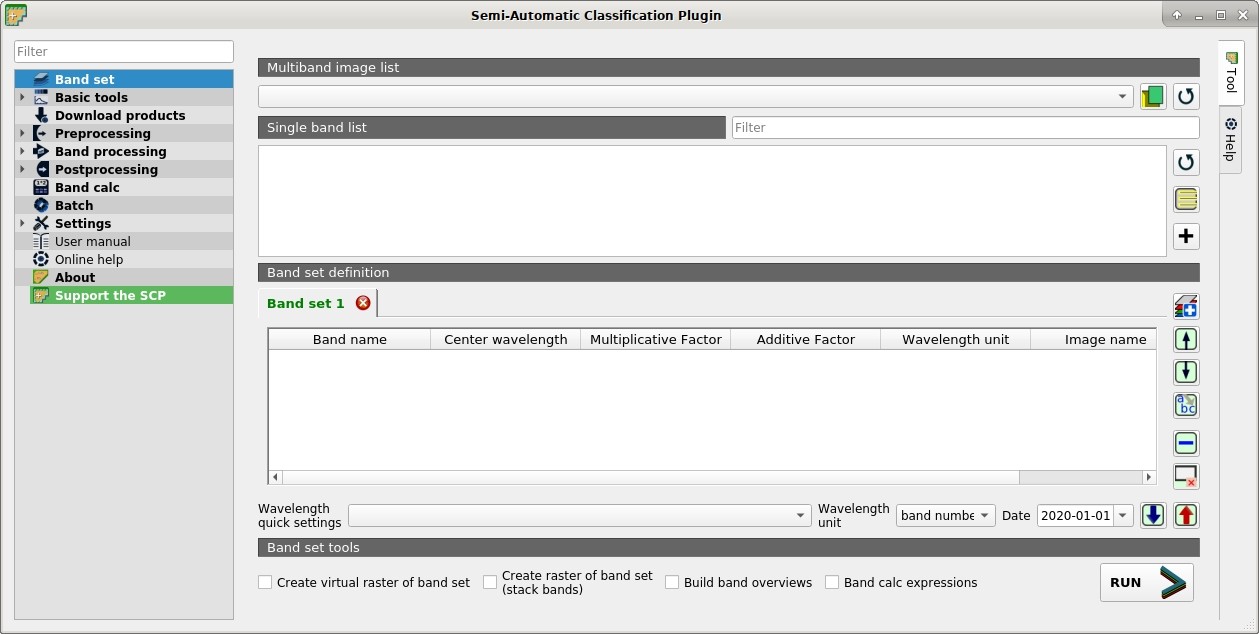
 Band set
Image input in SCP is named band set. This tab allows for the definition of one or more band sets used as input for classification and other tools.
Band sets are identified by numbers. The active band set (i.e. the tab selected in Band set definition with bold green name) is used as input for the tools in SCP dock and Working toolbar. Other SCP tools allow for the selection of band set numbers.
The Band set definition is saved with the QGIS project.
The tool Band set list allows for the management of band sets.
4.1.1. Multiband image list
This section allows for the selection of a multiband raster. If selected, raster bands are listed in the active band set.
 : select the input image from a list of multispectral images loaded in QGIS;
 : open one or more raster files that are added to the active band set and loaded in QGIS;
 : refresh layer list;
4.1.2. Single band list
List of single band rasters already loaded in QGIS. It is possible to select one or more bands to be added to the active band set.
Filter
 : filter the list;
- : refresh list of raster bands loaded in QGIS;
 : select all raster bands;
 : add selected rasters to the active band set.
4.1.3. Band set definition
Definition of bands composing the band sets . The active band set is the tab selected with bold green name. It is possible to add new band sets clicking the following button:
 : add a new empty band set;
Click the  in the tab to remove the corresponding band set.
Band sets can be reordered dragging the tabs.
in the tab to remove the corresponding band set.
Band sets can be reordered dragging the tabs.
The Center wavelength of bands should be defined in order to use several functions of SCP. If the Center wavelength of bands is not defined, the band number is used and some SCP tools will be disabled.
It is possible to define a multiplicative rescaling factor and additive rescaling factor for each band (for instance using the values in Landsat metadata), which are used on the fly (i.e. pixel value = original pixel value * multiplicative rescaling factor + additive rescaling factor) during the processing.
Every band set is defined with the following table:
 Band set #: table containing the following fields;
Band name
 : name of the band; name cannot be edited;
Center wavelength
: center of the wavelength of the band;Multiplicative Factor
: multiplicative rescaling factor;Additive Factor
: additive rescaling factor;Wavelength unit
: wavelength unit;Image name
: image name for multiband rasters;Date
: image acquisition date;
 : move highlighted bands upward;
 : move highlighted bands downward;
 : sort automatically bands by name, giving priority to the ending numbers of name;
 : remove highlighted bands from the active band set;
 : clear all bands from active band set;
- Wavelength quick settings
 : rapid definition of band center wavelength for the following satellite sensors:
 ASTER;
GeoEye-1;
GOES;
Landsat 8 OLI;
Landsat 7 ETM+;
Landsat 4-5 TM;
Landsat 1, 2, and 3 MSS;
MODIS;
Pleiades;
QuickBird;
RapidEye;
Sentinel-2;
Sentinel-3;
SPOT 4, 5, and 6;
WorldView-2 and WorldView-3;
- Wavelength quick settings
- Wavelength unit : select the wavelength unit among:
Band number: no unit, only band number;
\(\mu m\): micrometres;
nm: nanometres;
- Wavelength unit
Date
 : set the date of acquisition;
 : import a previously saved active band set from file;
 : export the active band set to a file;