4.4.3. Landsat
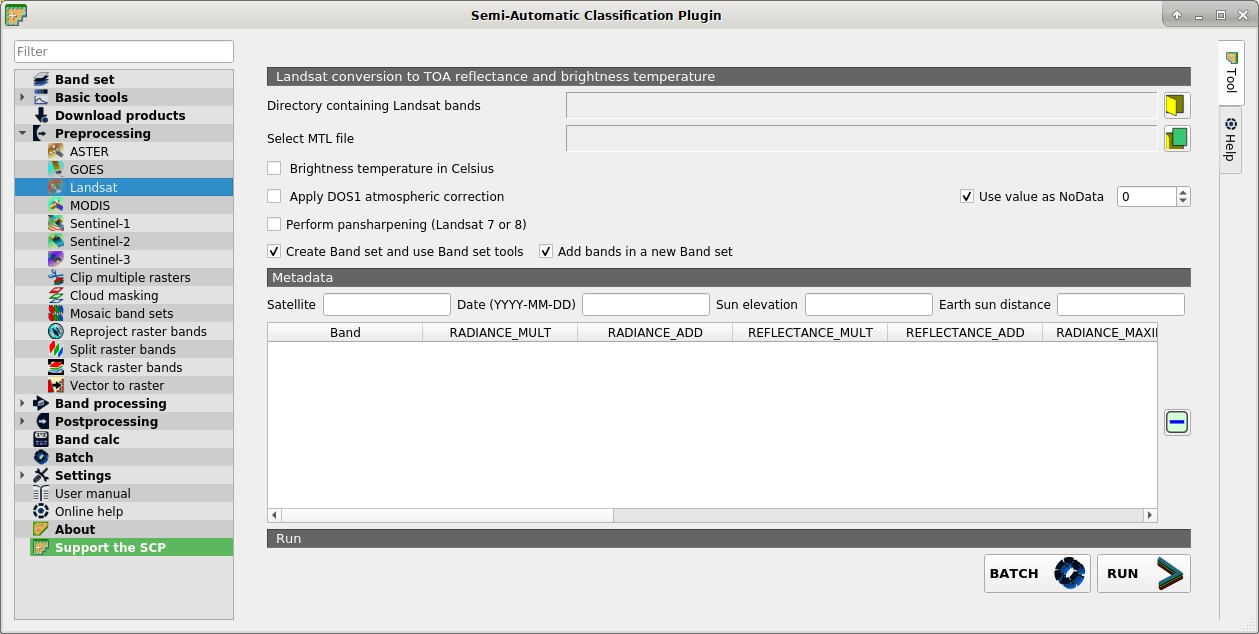
 Landsat
This tab allows for the conversion of Landsat 1, 2, and 3 MSS and Landsat 4, 5, 7, and 8 images from DN (i.e. Digital Numbers) to the physical measure of Top Of Atmosphere reflectance (TOA), or the application of a simple atmospheric correction using the DOS1 method (Dark Object Subtraction 1), which is an image-based technique (for more information about the Landsat conversion to TOA and DOS1 correction, see Image conversion to reflectance).
Once the input is selected, available bands are listed in the metadata table.
To reduce file size, output files are saved as data type UInt16 with scale 0.0001, which are interpreted as Float32 type by GDAL.
Pan-sharpening is also available; for more information read Pan-sharpening. The panchromatic band is preprocessed only if pansharpening is checked.
WARNING: For the best spectral precision you should download the Landsat Level-2 Data Products (Surface Reflectance) from https://earthexplorer.usgs.gov .
4.4.3.1. Landsat conversion to TOA reflectance and brightness temperature
Directory containing Landsat bands
 : open a directory containing Landsat bands; names of Landsat bands must end with the corresponding number; if the metadata file is included in this directory then Metadata are automatically filled;
Select MTL file

 : if the metadata file is not included in the Directory containing Landsat bands, select the path of the metadata file in order to fill the Metadata automatically;
 Brightness temperature in Celsius: if checked, convert brightness temperature to Celsius (if a Landsat thermal band is listed in Metadata); if unchecked temperature is in Kelvin;
- Apply DOS1 atmospheric correction: if checked, the DOS1 Correction is applied to all the bands (thermal bands excluded);
- Use value as NoData
 : if checked, pixels having
 NoDatavalue are not counted during conversion and the DOS1 calculation of DNmin; it is useful when image has a black border (usually pixel value = 0); - Perform pan-sharpening: if checked, a Brovey Transform is applied for the Pan-sharpening of Landsat bands;
- Create Band set and use Band set tools: if checked, bands are added to the active Band set after the conversion; also, the Band set is processed according to the tools checked in the Band set;
- Add bands in a new Band set: if checked, bands are added to a new empty Band set after the conversion;
4.4.3.2. Metadata
All the bands found in the Directory containing Landsat bands are listed in the table Metadata. If the Landsat metadata file (a .txt or .met file with the suffix MTL) is provided, then Metadata are automatically filled. For information about Metadata fields read this page and this one .
Satellite
 : satellite name (e.g. Landsat8);
Date
: date of acquisition (e.g. 2013-04-15);Sun elevation
: Sun elevation in degrees;Earth sun distance
: Earth Sun distance in astronomical units (automatically calculated if Date is filled; : remove highlighted bands from the table Metadata;
 Metadata: table containing the following fields;
Band: band name;
RADIANCE_MULT: multiplicative rescaling factor;
RADIANCE_ADD: additive rescaling factor;
REFLECTANCE_MULT: multiplicative rescaling factor;
REFLECTANCE_ADD: additive rescaling factor;
RADIANCE_MAXIMUM: radiance maximum;
REFLECTANCE_MAXIMUM: reflectance maximum;
K1_CONSTANT: thermal conversion constant;
K2_CONSTANT: thermal conversion constant;
LMAX: spectral radiance that is scaled to QCALMAX;
LMIN: spectral radiance that is scaled to QCALMIN;
QCALMAX: minimum quantized calibrated pixel value;
QCALMIN: maximum quantized calibrated pixel value;
BATCH
 : add this function to the Batch;
RUN
 : select an output directory and start the conversion process; only bands listed in the table Metadata are converted; converted bands are saved in the output directory with the prefix
 RT_and automatically loaded in QGIS;