4.4.11. Neighbor pixels
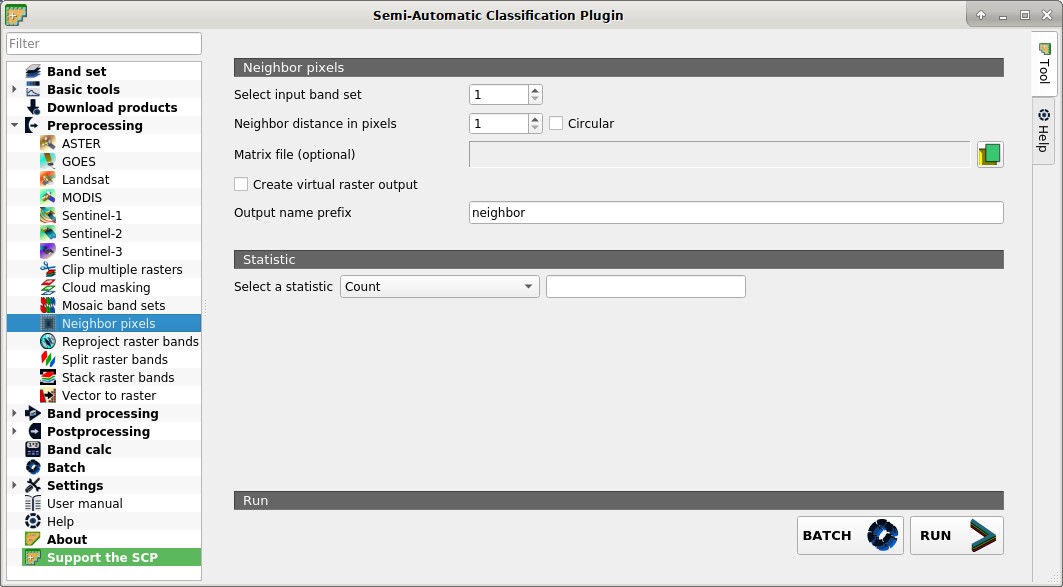
 Neighbor pixels
This tool allows for the calculation of several neighbor pixels statistics for every band of a band set defined in the Band set.
The statistics are calculated for every pixel of the input raster considering the values of the neighbor pixels. Neighbor pixels are defined through a distance or through a custom matrix.
For example, the following matrix represents the neighbor pixels within a distance of 1 pixel from a central pixel, resulting in a 3x3 matrix.
Neighbor |
Neighbor |
Neighbor |
Neighbor |
Center |
Neighbor |
Neighbor |
Neighbor |
Neighbor |
Several statistics are available.
The statistic Sum will result in a raster convolution.
For instance, this can be useful to apply an image filter to all the bands a band set for photointerpretation.
An output band is created for every band in the band sets.
4.4.11.1. Neighbor pixels
Select input band set
 : select the input Band set;
Neighbor distance in pixels
 Circular: if Circular is not checked, use a square matrix centred in one pixel considering all the neighbor pixels within this distance; e.g. a value of 1 results in a 3x3 matrix with weight 1 in every cell; a value of 2 results in a 5x5 matrix with weight 1 in every cell, such as:
1
1
1
1
1
1
1
1
1
1
1
1
1
1
1
1
1
1
1
1
1
1
1
1
1
if
Circular is checked, only the cells of the matrix within the radius of distance have value 1, such as:0
0
1
0
0
0
1
1
1
0
1
1
1
1
1
0
1
1
1
0
0
0
1
0
0
Matrix file (optional)

 : open a text file (.txt or .csv) containing a matrix structure; the text file must be a list of numbers separated by commas, representing the columns, and each line represents a row of the matrix;
 nancan be entered forNoDatavalues that will be excluded from the calculation; following an example of matrix file:nan,1,nan 1,1,1 nan,1,nan
Resulting in the following matrix:
NoData
1
NoData
1
1
1
NoData
1
NoData
- Create virtual raster output : if checked, output is created as virtual raster
.vrtcomposed of as many.tiffiles as the number of CPU threads defined in System; for large rasters this can speed up the process; Output name prefix
 : set the prefix for output file names (default is
 neighbor);
4.4.11.2. Statistic
Select a statistic
 : select a statistic; available options are
 Sum,Max,Min,Count,Mean,Median,Percentile,StandardDeviation; forPercentilea value can be entered;BATCH
 : add this function to the Batch;
RUN
 : choose the output destination and start the calculation;