4.5.3. Clustering
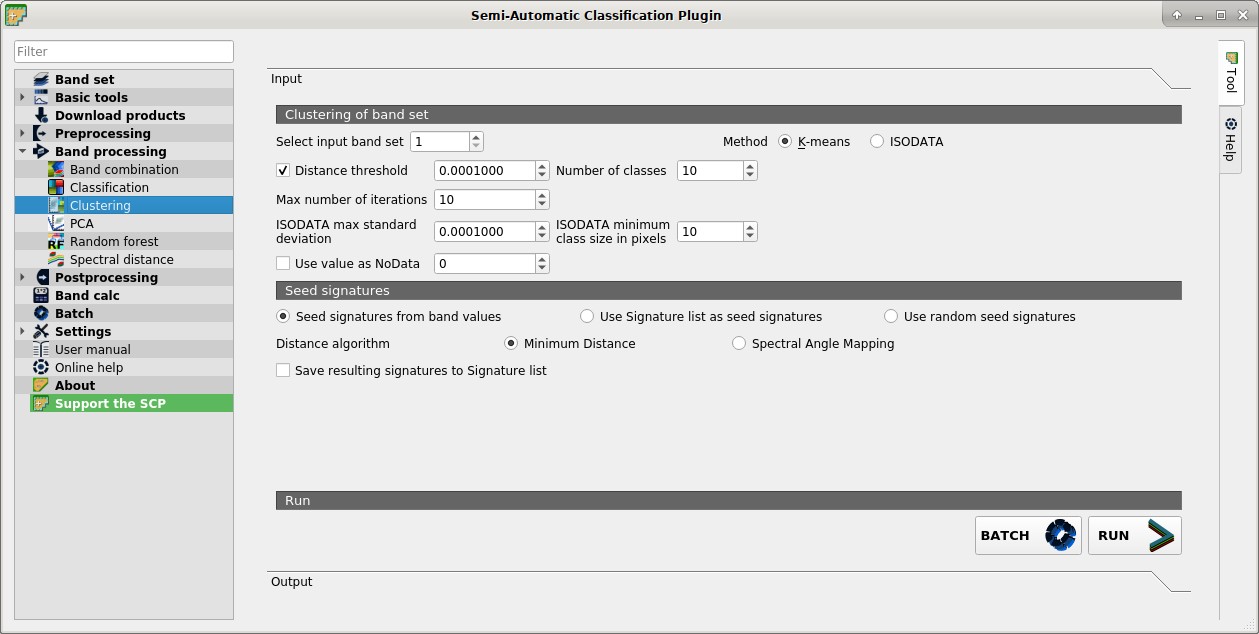
 Clustering
This tab allows for the Clustering of a Band set. In particular, K-means and ISODATA methods are available.
A report .txt is saved along with the classification, containing the class spectral signature and the spectral distance thereof.
4.5.3.1. Clustering of band set
Select input band set
 : select the input Band set;
Method
 K-means ISODATA: select the clustering method K-means or ISODATA;
 Distance threshold : if checked, for K-means: iteration is terminated if distance is lower than threshold; for ISODATA: signatures are merged if distance is greater than threshold;
Number of classes
: number of desired output classes;Max number of iterations
: maximum number of iterations if Distance threshold is not reached;ISODATA max standard deviation
: maximum standard deviation considered for splitting a class, for ISODATA algorithm only;ISODATA minimum class size in pixels
: desired minimum class size in pixels, for ISODATA algorithm only;- Use value as NoData : if checked, set the value of
NoDatapixels, ignored during the calculation;
4.5.3.2. Seed signatures
- Seed signatures from band values Use Signature list as seed signatures Use random seed signatures: select one options for seed signatures that start the iteration; the option Seed signatures from band values divides the spectral space of the Band set to get spectral signatures; the option Use Signature list as seed signatures uses the spectral signatures checked in ROI & Signature list; the option Use random seed signatures randomly selects the spectral signatures of pixels in the Band set;
Distance algorithm
Minimum Distance Spectral Angle Mapping: select Minimum Distance or * Spectral Angle Mapping for spectral distance calculation;- Save resulting signatures to Signature list: if checked, save the resulting spectral signatures in the ROI & Signature list;
BATCH
 : add this function to the Batch;
RUN
 : choose the output destination and start the calculation;