1. Accuracy
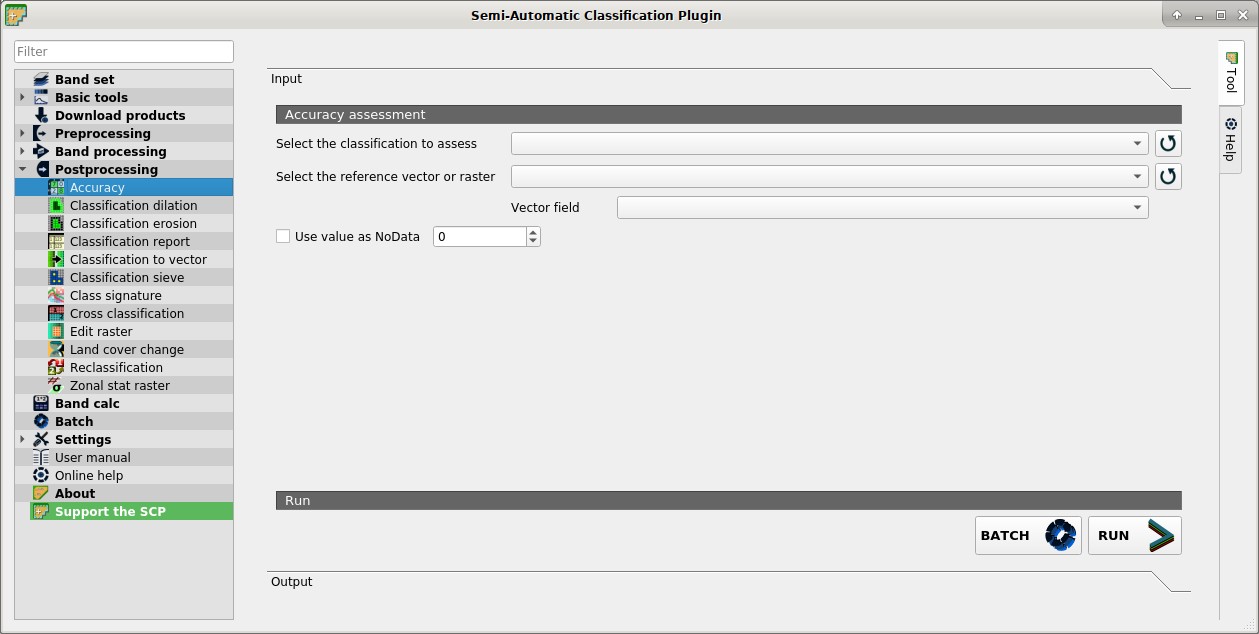
 Accuracy
This tab allows for the validation of a classification (read Accuracy Assessment ).
Classification is compared to a reference raster or reference vector (which is automatically converted to raster). If a vector is selected as reference, it is possible to choose a field describing class values.
Several statistics are calculated such as overall accuracy, user’s accuracy, producer’s accuracy, and Kappa hat. In particular, these statistics are calculated according to the area based error matrix where each element represents the estimated area proportion of each class. This allows for estimating the unbiased user’s accuracy and producer’s accuracy, the unbiased area of classes according to reference data, and the standard error of area estimates.
The output is an error raster that is a .tif file showing the errors in the map, where pixel values represent the categories of comparison (i.e. combinations identified by the ErrorMatrixCode in the error matrix) between the classification and reference.
Also, a text file containing the error matrix (i.e. a .csv file separated by tab) is created with the same name defined for the .tif file.
This tool supports virtual raster output; if the output file name ends with .vrt then the output is created as virtual raster composed of as many .tif files as the number of CPU threads defined in System; for large rasters this can speed up the process.
1.1. Accuracy assessment
Select the classification to assess
 : select a classification raster (already loaded in QGIS);
 : refresh layer list;
Select the reference vector or raster
: select a raster or a vector (already loaded in QGIS), used as reference layer (ground truth) for the accuracy assessment;- : refresh layer list;
Vector field
: if a vector is selected as reference, select a vector field containing numeric class values; Use value as NoData
  : if checked, pixels having
 NoDatavalue are excluded from the calculation;BATCH
 : add this function to the Batch;
RUN
 : choose the output destination and start the calculation; the error matrix is displayed in the tab Output and the
 error rasteris loaded in QGIS;